Local search has shifted dramatically into map-first and AI-driven experiences. Simply ranking on page one of Google isn’t enough – businesses must dominate maps and profiles. This means mastering Google Business Profile (Maps), Apple Maps/Business Connect, Bing Places, Waze and even social local features (Instagram, Facebook). At the same time, generative AI and voice assistants now influence who gets seen: only highly trustworthy, consistent listings (good reviews, exact data, rich content) win the new “AI search results.”
This deep-dive guide for business owners covers everything you need: the current 2026 landscape of local platforms, AI impacts, map ranking factors, conversion tactics (calls, bookings, messaging, reviews), technical SEO (schema, local pages, citations, NAP consistency), measurement (KPIs), real-world examples, and a 12-step action checklist. We also include comparison tables, recommended tools, and action plans by business size. Finally, we explain how Strottner Designs can help you implement these strategies, with tiered service options. (We assume a general local business context; adjust for your industry, budget, and region.)
The 2026 Local Search Landscape
Today’s consumers expect maps and chat assistants to give them local answers. Google Maps/Business Profile (GBP) remains the biggest player, but other platforms have risen. Here’s a quick rundown:
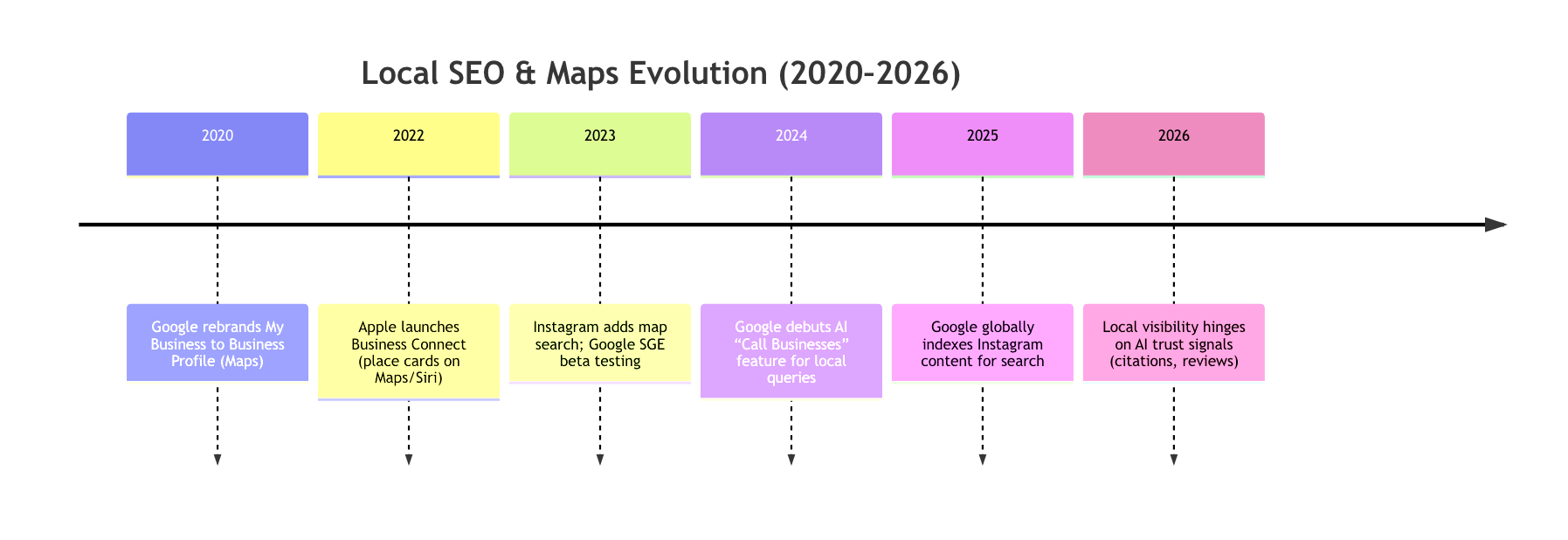
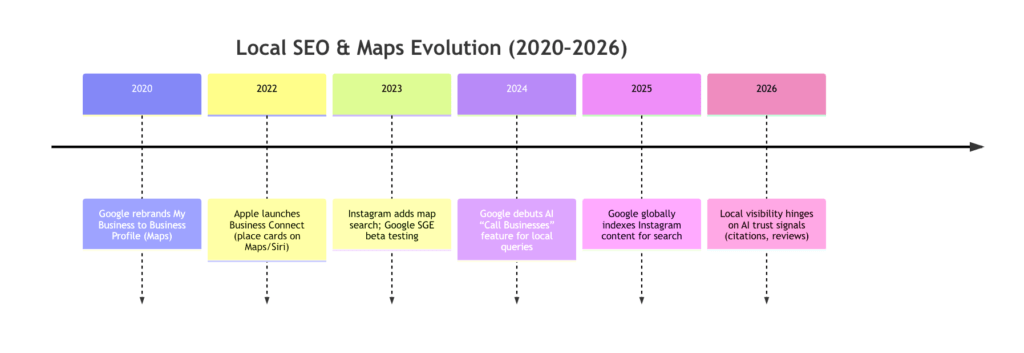
- Google Maps / Business Profile: The epicenter of local discovery. Your GBP listing can show hours, address, photos, services, posts, booking links, and it feeds directly into Google Search and the new AI “Search Generative Experience.” Google even lets users ask its AI to “call businesses” to check prices or availability on their behalf. To win, ensure your Google listing is complete and accurate – every field filled, every category chosen, and a sharp business description.
- Apple Maps (Business Connect): The default map on iPhones. In 2026, Apple lets businesses claim “place cards” to control Maps, Siri, Wallet, etc. Claimed listings reportedly get ~30% more views, and you can add high-quality cover photos, galleries, and custom actions (like “Book” or “Order” buttons) that Apple says boost click-throughs ~31%. iOS-heavy markets can’t ignore Apple: list your hours, phone, and even special actions (e.g. “Call me” or “Order on website”) to capture that audience.
- Bing Maps / Places: Smaller reach, but essential for Windows and Microsoft’s AI (Copilot) ecosystem. Bing Places is free and accepts instant Google imports for easy setup. Unlike Google, Bing displays star ratings from third-party sites (Yelp, Facebook, etc.), so managing those reviews is important. Optimizing your Bing listing (consistent info, added photos, and third-party reviews) ensures Microsoft’s AI assistants correctly cite your business.
- Waze: The navigation app for drivers. Organic SEO is limited, but Waze offers “Branded Pin” ads to put your business icon on its map. Make sure your address is rock-solid (Waze uses Google data). For commuter-heavy businesses (like gas stations, fast food), Waze advertising can steer local traffic your way.
- Meta’s Local Features: Social media is now a local discovery channel. Instagram and Facebook allow location-based posts and searches. In 2026, Google even indexes public Instagram content (posts, Reels, Stories), so your tagged photos can show up in broader searches. Treat Instagram as a “visual search engine” for places: optimize your IG business profile, tag your location on posts, and encourage customers to share photos at your store. Also, ensure your Facebook Business Page is updated with address, hours, and regular local posts. These social signals now feed into local ranking and AI answers.
In short, be everywhere your customers look. Claim your profiles on all platforms and keep the info (Name, Address, Phone – NAP) identical on each. Consistency across Google, Apple, Bing and social is now a must for AI to trust your business.
AI, Voice, and Map-First Interfaces
By 2026, the way people search is dominated by AI assistants and map apps. When a user asks for a “near me” query – or just taps around on Maps – an AI backend (Google’s Gemini, Microsoft Copilot, etc.) often chooses answers. Research shows that only a tiny percentage of businesses even appear in these answers. In fact, a Jan 2026 study found that only 1–11% of local businesses were recommended by AI assistants, vs ~36% in Google’s traditional 3-pack. AI visibility is “three to thirty times harder” than classic local ranking. Why? Because AI filters mercilessly for trust: it favors businesses with perfect data, tons of positive reviews, and authoritative content.
Impact of AI Search: Google’s AI now writes chatty summaries and overviews for local queries. These summaries are built on reviews, FAQ content, and site data. If your listing has schema markup and fresh details (menus, services, FAQ), AI can pull concise info straight from your profile or web pages. Conversely, missing or inconsistent data means AI might skip your business entirely. For example, recent updates let Google’s AI call a business to find prices. So if your business phone isn’t reachable or your hours are wrong, you’ll miss out.
Conversational & Map-First: Mobile users often start with the Maps app or a voice assistant (Google Home, Alexa, Siri). In that context, the most important goal is to be included in the answer, not just ranked. Google’s 2025 data showed that being “open at search time” is now a top-five factor. In other words, showing real-time information like live hours or current busy times helps get your pin chosen.
Takeaway: Optimize for AI by overwhelming it with trust signals. Keep every profile updated minute-by-minute (hours, services), build genuine high ratings, and use rich content (FAQs, how-to’s on your site) so AI has confidence in your accuracy.
Map Ranking Factors (2026)
What exactly makes one business outrank another in a map pack or AI answer? Recent local SEO research paints a clear picture of 2026’s priorities:
- Primary Category & Relevance: Your chosen category (and any additional secondary categories) remain the single most important factor. Make it as specific as possible (e.g. “Italian Restaurant” not just “Restaurant”). Include relevant keywords in your business name or service listings if they’re legitimate (e.g. “Bob’s Plumbing & Repairs”).
- Proximity: Being close to the searcher is still huge. Google and Apple both weight proximity heavily in maps results. This one is mostly static – you can’t really “fix” distance, but ensure your business address is set correctly and consistently in every profile.
- Reviews & Ratings: Far more important than ever. Studies show that high star ratings and positive review volume are among the top signals for map visibility and especially for AI features. In practical terms, aim for a 4.5+ star average on Google (and as many good reviews as possible on all platforms). Google has explicitly tied review quantity, recency, and business response to ranking strength. Bonus: Google now pulls star ratings from select third-party sites too, so cultivate reviews on Facebook, Yelp, etc.
- Citations & Mentions: Local directories and mentions are back in vogue. With AI, citation signals mean not just traditional directories but any authoritative mention of your business – news articles, local blogs, even social media mentions. The latest reports indicate that three of the top five factors for AI-driven local visibility are citation-based: expert lists (“Best of City”), editorial mentions, and sheer mention volume across the web. In practice, this means ensuring you’re listed on all major business directories, plus securing features in local press or industry roundups.
- Content & Local Pages: Having unique website pages for each location or service is critical. Firms that created dedicated pages saw the biggest jump in both map and organic local rankings. These pages should include clear headings, keywords for your services/areas, and LocalBusiness schema. Google’s AI loves well-structured content; pages with FAQs or good descriptions of each service will boost your chance of appearing in answer boxes.
- User Engagement Signals: Google monitors what happens after a user clicks. Metrics like click-through rate on the profile (calls, direction requests, website clicks) and time spent on your site are starting to matter. Anecdotally, businesses that see spikes in Map clicks often get immediate boosts in visibility. Encourage clicks (see Conversion tactics below) and monitor analytics to refine your profile continuously.
- Special Features: For some verticals, enabling features (menus for restaurants, book buttons for salons, etc.) improves visibility. For example, Google’s “Reserve with Google” for dining and wellness got easier to use. Also, appearing in Local Services Ads (in service verticals) can lift your general profile visibility as well.
In summary, treat your local listing as a mini-website: fill every field, use all keywords naturally, and get reviews. Then layer on citations and content. In the era of AI, being authoritative and active matters more than ever.
Optimizing Your Map Listings
Google Business Profile (Maps).
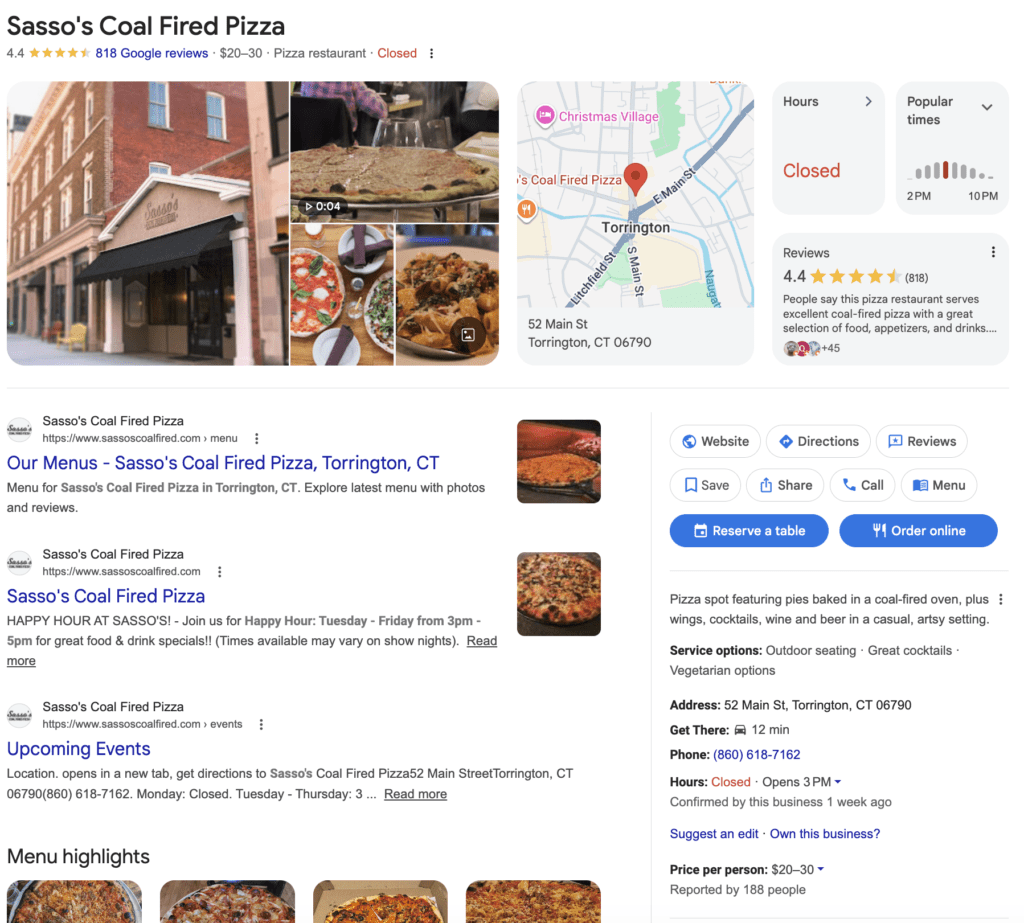
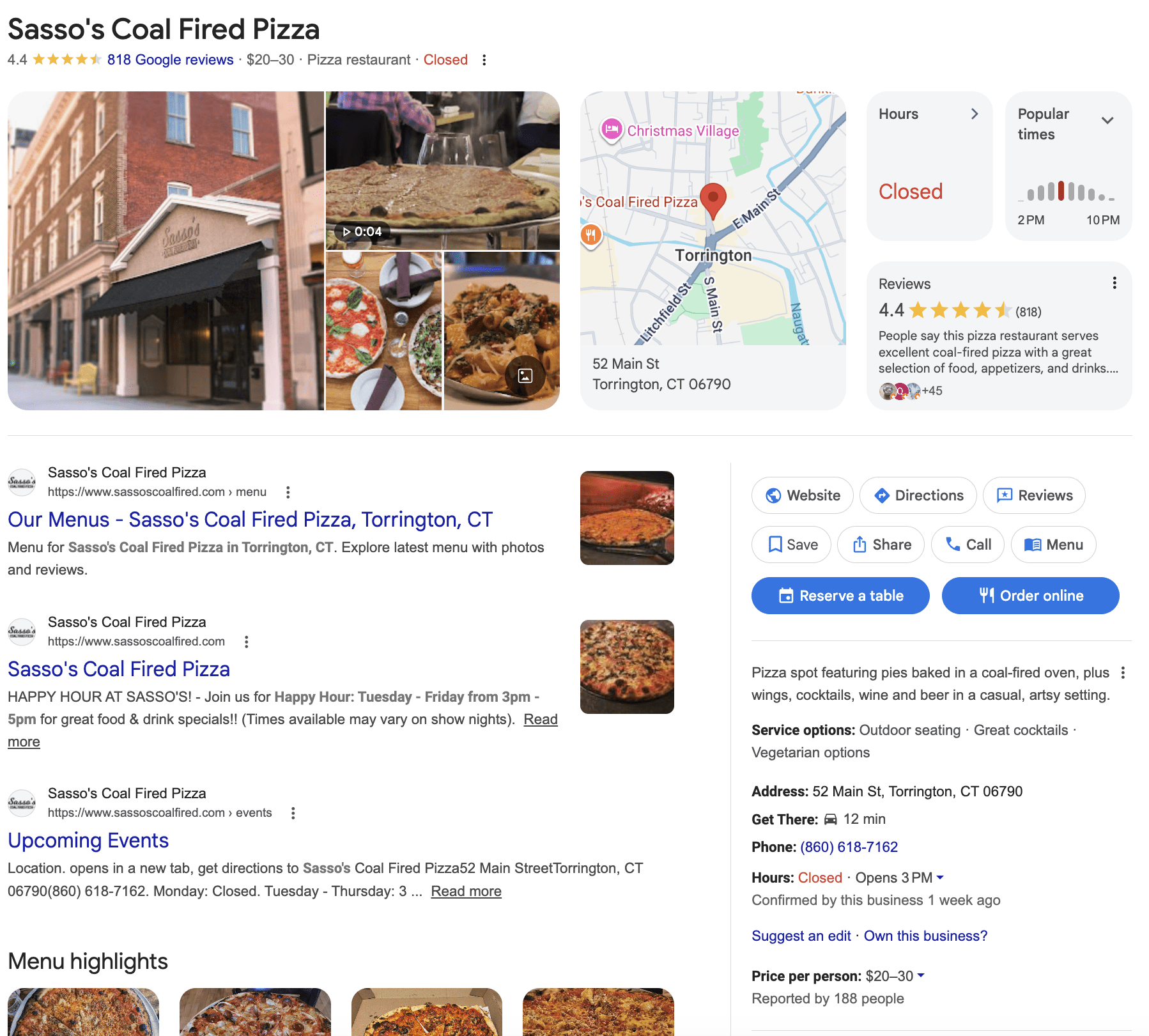
An example listing, this Torrington, CT pizza place has all of the critical features included…
- Complete Your Profile: Fill every field. Include your exact legal business name, address, phone (consistent NAP everywhere) and an engaging description of your services. Use all 10 service slots if possible (Google lets you list up to 10 offerings, with searchable keywords).
- Choose & Update Categories: Pick the most specific primary category. If you offer multiple services, add secondary categories. Google sometimes lets you enter custom categories in the Business Profile. Use them wisely (e.g. “Thai Restaurant,” “Massage Therapist,” etc.).
- Photos & Video: Upload high-quality, genuine photos regularly. The first photo (cover image) really matters – treat it like a banner. Profiles with photos get significantly more engagement: studies show listings with images get ~40% more direction requests and generally see more clicks. Include interiors, exteriors, staff, and products. Consider a short video (up to 30 seconds) giving a virtual tour or highlighting a popular item.
- Action Buttons (CTAs): Enable every relevant button. If you can accept bookings or orders, link up a reservation system (Google’s integration with OpenTable, Booksy, etc. is key). Turn on Messaging (customers can text you from Maps) and ensure someone monitors it. Set up the “Request a Quote” or “Call Now” buttons where available. These make it easy for a viewer to convert immediately.
- Google Posts: Think of Posts (the “Updates” section) as free mini-ads. Promote a special offer, event, or new product. Each post shows up under your profile and even in search results sometimes. Refresh posts weekly or whenever you have a promo – active profiles perform better.
- Reviews: Encourage happy customers to leave 5-star reviews on Google. Aim to gather new reviews consistently (e.g. send a review link by email after each service). More reviews not only boost rankings but also convert visitors: 97% of people who read reviews also read the business’s response, so reply to every review (positive or negative) promptly to show you care.
Apple Maps / Business Connect.
Claim your Apple Maps listing (free via Apple’s Business Connect). An important note, it has been our experience that claiming an Apple listing is significantly ore complicated than claiming your Google listing, patience is required. Then:
- Place Card Details: Add your phone, address, hours (including holidays), and a detailed “About” description. Upload a crisp cover photo and interior photos. Apple’s interface shows your logo and cover photo prominently, so pick eye-catching visuals.
- Custom Actions: You can create buttons like “Book Reservation,” “Order Online,” “Schedule Service,” etc. Use these to funnel users to key conversions. Apple claims listings with action buttons see ~31% higher engagement. For example, a salon might link “Book Appointment,” or a restaurant “Reserve a Table.”
- Branded Email and Wallet: In your profile, enable branded email (your company’s logo in emails sent from you) and tap-to-pay (so your logo appears on receipts). These aren’t map features per se, but help brand recognition and trust across Apple’s ecosystem.
- Insights: Apple provides analytics on how users find your card and what actions they take. Check these insights to refine your listing.
Bing Places.
- Import from Google: The fastest way is to sign into Bing Places and use their one-click Google import tool. It copies your info and gets you instantly verified.
- Photos & Deals: Add business photos and, if applicable, a Deal (Bing’s term for a special offer that stays visible longer than a Google Post). Deals can help your Bing listing stand out in Windows search.
- Third-Party Reviews: Encourage reviews on Facebook, Yelp, or TripAdvisor, since Bing often displays those on your listing. Bing’s local algorithm trusts these external reviews, so having positive ones will boost your Bing visibility.
Waze.
- Business Listing: On Waze, you can add your business (via Google) so drivers see your location on the map. It’s mostly a directory listing. If your business is relevant to drivers (gas station, restaurant, drive-thru), make sure it’s in Waze.
- Branded Pin Ads: Consider Waze’s ad options. A “Branded Pin” shows your logo on the map and pops up as drivers pass by. Target by radius or route for highest impact. There are creative ad formats (e.g. takeover screens, roadblocks) if your budget allows.
Meta (Instagram/Facebook) Local.
- Facebook Page: Verify your Facebook Business Page. Add address, hours, and a map pin. Use the “Services” section to list what you do. Google now sometimes shows Facebook star ratings, so keep those high. Post regularly to your Page about local news or offers – these posts can appear when people search for businesses in your area on Facebook.
- Instagram Places: When you post on Instagram, always tag your location. Encourage visitors to do the same. Instagram’s “Place” feature lets users browse photos by location. A strong visual presence (e.g. attractive product shots or interior photos) can attract the younger local crowd. Also use local hashtags (city or neighborhood name + your business type). Since Google indexes Instagram content now, those tagged photos help your overall search footprint.
- Reviews/Check-ins: Facebook still has a review/ratings feature for local businesses. Encourage satisfied customers to check in on Facebook or write a short recommendation. These social proofs can influence a potential customer and feed search signals.
Technical & Content Tactics
Beyond on-profile optimization, don’t forget the website and backend:
- Local Business Schema: Add structured data markup to your website (JSON-LD format) using the LocalBusiness schema. Include your name, address, phone, opening hours, geo-coordinates, and service area. This helps Google pull info directly into the knowledge panel and Maps. Also use “Review” schema if you display testimonials (so stars might show in search) and “FAQ” schema for common local questions.
- Local Pages: Ensure your website has a page for each physical location or service area. These pages should have unique content about that area, with local keywords (e.g. “Denver yoga classes”). Embed a Google Map, your hours, and a clear CTA (like “Book now” button). If your business has multiple locations, these pages are critical ranking factors and help satisfy AI queries about specific neighborhoods.
- NAP Consistency: On your website footer (and every local page), display your Name/Address/Phone exactly the same way as on your profiles. Do the same in every directory citation. Even small differences (St. vs Street, or a missing suite number) can confuse Google. Tools like BrightLocal or Yext can audit and standardize your citations.
- Geo-Tagged Images: If possible, tag your photos with location metadata (latitude/longitude) before uploading. At least include city/neighborhood in the filenames or alt text of your images on the website. This subtle SEO tactic reinforces to Google which location the image belongs to.
- Content & Authority: Invest in content that establishes you as an authority in your locale. Examples: a blog post about “Top Things to Do in [Neighborhood]” (for a restaurant) or a case study of how you served local customers. Quality local content can earn backlinks from local organizations (chambers, events) and signals trust to search engines.
Conversion Optimization on Maps
Getting seen on Maps is only half the battle – the other half is turning that visibility into leads or sales. Here are conversion-focused tactics:
- Strong Calls-to-Action: Make it crystal clear what visitors can do. On Google/Apple, ensure buttons like “Call Now,” “Get Directions,” and “Visit Website” are active. If you offer online appointments, link directly with tools like Calendly, Booksy, etc. For restaurants, ensure your menu and reservation link are up to date so diners can book or order immediately.
- Easy Booking & Orders: Integrate booking platforms (Google Reserve, OpenTable, MindBody for gyms/salons, etc.) so customers never have to leave the search result to book. The easier you make it (one click, no form-filling), the more conversions you get. Same for e-commerce – if users can order directly from Maps via an integrated ordering system (Food delivery, hotel booking, etc.), turn that on.
- Messaging & Live Chat: If your Business Profile supports it, turn on messaging/chat. Many local customers prefer texting over calling. Quick response times here are key. You can also use chatbots on your website triggered by map referrals.
- Review Gating: Keep building reviews. A profile with hundreds of recent 5-star reviews feels trustworthy. Mention in your profile that you have e.g. “500+ 5★ reviews”. This social proof will encourage map browsers to pick up the phone or visit your site.
- Google Posts & Offers: Periodically post time-sensitive offers (e.g. “10% off this week – show Google this post!”). This can be tracked by unique coupon codes or UTM parameters on your site. Google Posts appear on your profile, so they are a mini-landing page you control.
- Local Links & Citations: Convince local blogs or news sites to write about a sale or event at your business. These mentions often include a link to your site or a quote. They boost your profile’s authority and serve as endorsements that can be quoted by AI overviews.
Measurement & KPIs
As you implement local SEO, you must measure success:
- Google Business Profile Insights: This built-in tool (renamed “Performance” metrics) shows exactly how people found and interacted with your profile. Key data: how many views you got on Search vs Maps, how many clicks on “Call,” “Website,” and “Directions,” and the specific search terms that led users to you. Check this monthly. Are calls up? Did “meal delivery near me” suddenly become a top query for your restaurant? Use these insights to tweak your profile content or services.
- Website Analytics: Tag local profile traffic with UTM codes so your web analytics (Google Analytics 4 or similar) can isolate it. In Google Analytics, filter for the UTM campaign of “businessprofile” to see how many users came from GBP, which pages they viewed, and if they converted (signed up, bought, called via a tracked link). You can even set up event tracking for “click to call” on your website phone links.
- Conversion Tracking: Use a call-tracking provider or Google Ads (if you run Local Services Ads) to record phone leads that originated from map searches. If possible, track in-store visits or foot traffic via offers or promotions (e.g. “show this code at register”).
- Rank Tracking: Use a local rank tracking tool (BrightLocal, Whitespark, Semrush’s Position Tracking with geotargeting) to monitor your position in map packs for key terms. Compare to competitors. Note that with AI-driven results, traditional rank is less visible – instead, focus on the “share of voice” (percentage of relevant searches where you appear anywhere).
- Social and Review Metrics: Track your number of reviews and average rating over time. Also, track engagement metrics: clicks on posts, calls from social, and any inbound messages. A sudden spike in reviews or a viral post should correlate with traffic increases.
KPIs to watch: profile views, search impressions, click-to-calls, booking completions, website visits from maps, and eventually revenue from map-related leads. Regularly report these to gauge ROI.
Case Studies & Examples
- Furniture Store Success: A San Diego furniture retailer (case study by a local SEO agency) saw a 1,100% increase in web traffic over 6 months by focusing on local SEO. They created separate pages for each location, fully optimized their GBP profiles, and built citations. The result: #1 ranking in Google’s Map Pack for major keywords and a surge in showroom visitors. This shows that even in competitive markets, local SEO fundamentals pay off big.
- Restaurant Reservation Lift: A 2025 analysis found that restaurants enabling Google’s Reserve-with-Google feature saw reservation rates jump ~20%. For example, a small bistro added the Reserve button to its GBP and synced with its OpenTable account. Within a month, 15% of their bookings came directly from Google/Maps, freeing phone lines and increasing visibility.
- Dental Clinic Growth: A dental practice ran a local SEO campaign by optimizing their GBP and launching a review collection drive. They doubled their 5-star reviews in 3 months, which caused their business to show up for more “best dentist near me” queries. Their call volume grew by 35% over two quarters. Their secret: consistent follow-ups for reviews and quick responses to patient questions on Google’s Q&A.
These examples highlight key takeaways: complete profiles + reviews + localized content = more customers.
12-Step Local SEO Checklist
- Claim & Verify Listings: Create or claim your Business Profile on Google, Apple, Bing, Waze, Facebook, and others. Complete the verification processes.
- Complete Every Profile Field: Fill in NAP (exactly the same on all platforms), hours (including holidays), categories, website, and a keyword-rich description.
- Optimize Categories & Services: Choose precise primary category; add relevant secondary categories. List all your services/products in the profile, using natural customer language.
- Upload Quality Photos & Videos: Add professional photos of your business (logo, signage, interior, products) and short videos. Update quarterly to show activity.
- Add Posts & Updates: Regularly publish Google Posts or Apple promotions and social media updates. Highlight offers, events, and news (seasonal menus, flash sales).
- Enable Action Buttons: Turn on booking, call, message, or order buttons. Integrate booking or delivery platforms. Aim for one-click conversions.
- Implement Structured Data: Add LocalBusiness schema markup on your website (address, hours, menus, etc.). Use FAQ schema for common questions.
- Create Local Pages: Build/optimize location-based pages on your website (each city/neighborhood you serve). Include detailed descriptions, testimonials, and embed maps.
- Ensure NAP Consistency: Audit and correct your Name/Address/Phone on all listings and your website. Use citation tools to find discrepancies.
- Gather & Respond to Reviews: Launch a review-generation strategy (email requests, review widgets). Respond to all reviews promptly and professionally.
- Build Citations & Mentions: Submit your business to key directories (Yelp, YellowPages, niche sites) and get featured in local media or blogs. Ensure citations match exactly.
- Monitor & Adjust: Track results with GBP Insights, analytics, and rank trackers. Review your KPIs weekly/monthly. Tweak listings or content based on what’s working (e.g., add a new service to your profile if its keywords are trending).
Platform Comparison
|
Platform
|
Features
|
Audience
|
Optimization Focus
|
Cost
|
|
Google Maps/GBP
|
Listings with photos, posts, Q&A, reviews, booking links
|
General consumers on Google
|
Complete profile, star reviews, local keywords, posts
|
Free (paid Ads optional)
|
|
Apple Maps
|
Place cards with images, custom actions (Book/Order)
|
iOS users (many locals)
|
Claim Business Connect, add photos, action buttons
|
Free
|
|
Bing Maps/Places
|
Listings tied to Windows, includes 3rd-party reviews
|
Windows & Bing users, Copilot
|
Sync from Google, gather reviews on Yelp/FB, add deals
|
Free
|
|
Waze
|
Navigation app pins; Branded Pin ads
|
Drivers/commuters
|
Accurate address, optionally run Pin ad campaigns
|
Free listing; paid ads
|
|
Instagram/FB
|
Local search, location tags, social reviews
|
Social media users, <35 yrs
|
Update business page, use location tags, encourage UGC
|
Free (ads optional)
|
Tools & Tech Stack
- Management Tools: BrightLocal, Whitespark or Synup for citation tracking and local rank tracking. Google Business Profile Manager and Apple Business Connect are free essentials.
- Analytics: Google Analytics 4, Google Search Console, and GBP Insights for performance data. Consider a call-tracking service (e.g. CallRail) if phone leads are key.
- Review Tools: Podium, Birdeye, or simple review link generators to streamline feedback collection.
- Social: Meta Business Suite for FB/IG management; Hootsuite/Buffer for scheduling local social posts.
- Booking Platforms: If applicable, OpenTable, Toast, MindBody, etc. that integrate with search listings.
Choose tools that match your scale. Small businesses might rely on the free/low-cost options above; enterprises often invest in enterprise platforms (Uberall, Yext, Uber for Brands) and data analytics solutions.
Action Plan by Business Size
- Solo / Single-Location Business:
- Focus: GBP and Apple profile, website page, local citations, and reviews.
- Actions: Claim listings, polish one website location page, get initial reviews.
- Tools: Use free tools (Google Business Manager, basic citation finder). DIY-friendly training (we can guide you).
- Multi-Location SMB (2–20 stores):
- Focus: Scale consistency across locations.
- Actions: Standardize NAP, use a listings management platform or service, create separate pages for each location on your site, and run unified review campaigns.
- Tools: Consider local SEO software (BrightLocal, Yext) and PPC for local ads if needed. Monthly reporting is key.
- Enterprise / Franchise (20+ locations):
- Focus: Systematize and integrate.
- Actions: Implement a robust local-data management system, invest in high-quality local content (blogs, location pages), conduct regular audits of every listing, and analyze ROI with advanced analytics.
- Tools: Enterprise platforms (Uberall, Moz Local), attribution modeling (CRM integration), large-scale review programs.
In all cases, start by auditing where you stand (using free ranking tools) and then tackle the top priorities from our checklist. Local SEO is an ongoing process – expect 3–6 months to see real gains in maps and conversions.
What Strottner Designs Can Do For You
At Strottner Designs, we’re a full-service agency with 20+ years of experience in web design, branding, and SEO. We can handle every aspect of your 2026 local SEO strategy:
- Local SEO Audit & Planning: We’ll perform a comprehensive audit of your website and all local listings (Google, Apple, Bing, Waze, social). We identify gaps (e.g. missing hours, poor reviews, inconsistent citations) and create a detailed roadmap.
- Profile Setup & Optimization: We’ll claim and verify your Google Business Profile, Bing Places, and social pages. We then fully optimize them – writing your description, selecting categories, uploading images, setting up booking or order buttons, and writing Posts/Updates.
- Website & Schema Implementation: Our team can build or update your local landing pages, ensuring each location has unique content and integrated schema markup. If needed, we can also redesign your website to improve performance on search (fast load times, mobile-responsive design, clear CTAs).
- Content & Review Strategy: We help you generate engaging local content (blogs, FAQs) and implement an ongoing plan to get more reviews (email templates, kiosk prompts, social media shout-outs).
- Analytics & Reporting: We set up tracking (GA4, GBP Insights) and provide monthly reports on your map visibility, website traffic, and leads. You’ll see calls, direction clicks, and bookings grow over time.
Regardless of size or budget, Strottner Designs has the expertise to make your business the local leader. We pride ourselves on clear communication and measurable results.
Conclusion
In 2026, dominating local search means mastering maps. Follow this guide step-by-step, and you’ll ensure your business not only ranks but converts on every local platform. Whether you tackle it in-house or partner with an expert, the investments you make today will pay off in new customers coming through your doors tomorrow.
Does this feel like a lot to handle while running your business? The solution to that is easy, contact us today and we’ll do it for you!

Interested in a new site and SEO, or just a new site? Visit Home of the Free Website to learn how we can build you a free or affordable site.